
Most AI presentation tools are built around prompts. Dokie AI feels different because it is more useful when you already have content.
This review looks at Dokie AI from that angle and explains why it stands out as an AI presentation maker for people who need to turn documents, notes, and files into slides.
Most Presentation Work Does Not Start With a Prompt
A lot of AI slide tools are marketed in the same way. They ask you to type a topic, click generate, and watch a deck appear. That sounds useful, but for many real users, that is not how presentation work starts.
In real life, people usually already have the content. A marketer may have a report in PDF format and campaign notes in a Word file. A consultant may have a project brief, screenshots, and a spreadsheet. A founder may have meeting notes, a draft memo, and a landing page. A student may have research notes, an essay, and a few charts. The work is not about inventing content from zero. The work is about turning scattered materials into a deck that makes sense.
This is where Dokie AI becomes interesting. Instead of acting only like a prompt-based AI slides generator, it feels more like a bridge between existing content and presentation output. That is a very different angle from many other tools in this category, and for a lot of users, it may actually be the more useful one.
What Is Dokie AI?
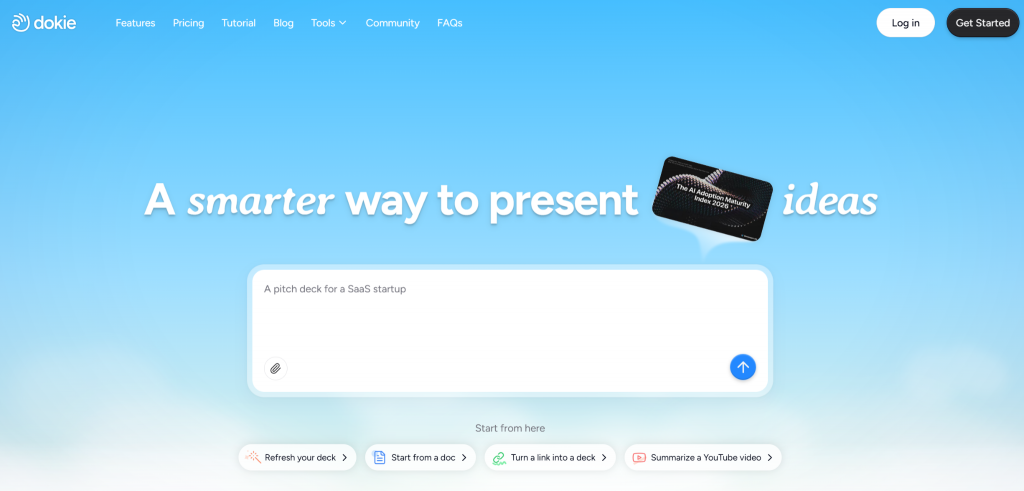
Dokie AI is an AI slide maker that helps users turn different types of source content into slides. It can still work as a normal AI PPT maker, but its strongest use case is not just “topic to deck.” Its bigger value comes from helping users move from documents, notes, spreadsheets, images, and web content to a presentation draft much faster.
The platform supports these content conversion features:
- PDF to Slides
- Word to Slides
- Text to Slides
- Excel to Slides
- JPG to Slides
- PNG to Slides
- HTML to Slides
- DOC to Slides
That range matters because it reflects the way presentations are actually built. Most teams and individuals are already working across different formats. A presentation tool that can pull those formats closer to slide output has a real advantage.
Why This Angle Matters More Than It Looks
Many people evaluating the best AI PPT makers focus on the wrong question. They ask, “Can this tool make slides?” That question is too basic now. Most tools can do that.
The better question is, “Can this tool reduce the messy work between having information and having a usable deck?”
That messy work is where time disappears. You gather information, sort through files, copy content, rewrite points, build a structure, and then finally start making slides. Even if an AI presentation maker can generate something in a minute, that does not help much if you still need to move everything manually into the system or fix the whole story afterward.
Dokie AI is appealing because it targets that middle stage. It helps users work from the materials they already have and shortens the path to a first draft deck. That is not as flashy as “instant presentation magic,” but it is often much more valuable.
Dokie AI as a Content Conversion Tool
One of the easiest ways to understand Dokie AI is to think of it less like a blank-page creator and more like a content conversion tool for presentations.
Take PDF to Slides as an example. Many business reports, research docs, internal summaries, and client updates live in PDF form. Turning those into a deck usually means manually reading, extracting, rewriting, and reorganizing the content. PDF to Slides helps reduce that work.
The same is true for Word to Slides. A lot of presentation work begins as a written document. Strategy memos, content outlines, campaign briefs, proposals, and internal notes are often created in Word before anyone even opens a slide tool. Word to Slides helps move from document thinking to presentation thinking much faster.
Text to Slides is useful in a different way. This is the feature for rough notes, bullet lists, quick outlines, and meeting summaries. Many people do not need a fully polished written document before they start a deck. They just need to turn rough thinking into structured slides. That is where Text to Slides helps.
Excel to Slides is especially important for business users. A lot of decks are built around reporting. Growth teams, marketers, finance teams, and operations teams all work from spreadsheets. If your performance data or summary table is already in Excel, a tool that helps move from spreadsheet to deck has immediate value.
Then there are the visual and web-based formats. JPG to Slides and PNG to Slides are useful for screenshots, visuals, charts, ad examples, product images, or UI references. HTML to Slides is especially interesting for users working with landing pages, product pages, blog content, or web drafts. And DOC to Slides adds broader support for users who work with different document file types.
When you look at all these together, Dokie AI starts to feel less like a novelty AI tool and more like a workflow product for presentation building.
The Real Value: Less Rebuilding
The biggest benefit of Dokie AI is not that it gives you a final presentation in one click. The bigger value is that it reduces how much rebuilding you have to do.
Rebuilding is one of the worst parts of deck creation. You already have the information, but it lives in the wrong format. So you have to copy it, summarize it, restructure it, and reformat it. That process eats time, especially for people who create presentations often.
Dokie AI can reduce that burden because it starts closer to the raw materials. Instead of asking users to translate their content into presentation-ready language before they even begin, it helps with that translation. That makes it a more useful AI PPT maker for people who are not looking for creativity as much as they are looking for efficiency.
In this sense, Dokie AI is strongest when the user already knows what the presentation is about but wants a faster way to get to the first solid draft.
Who Dokie AI Is Best For
Dokie AI is a strong fit for several kinds of users.
It makes sense for business users who create reports, internal updates, or client presentations often. If your work already produces documents, spreadsheets, and summaries, Dokie can help turn those into slides faster.
It is also useful for marketers. Marketing teams constantly move between data, strategy notes, campaign screenshots, landing pages, and client-facing materials. A tool that can turn these formats into slides more directly is highly practical.
Consultants can also benefit because much of their work begins in documents and analysis, not in slides. Dokie helps bridge that gap.
Founders and startup teams are another fit. Investor updates, team reviews, product summaries, and pitch materials often begin as notes or docs. Dokie makes that transition smoother.
Even students and educators can benefit, especially when they already have written work or research materials and want to turn them into a presentation.
Output Style and Presentation Quality
Dokie AI is not trying to be the most artistic AI presentation maker on the market. Its style leans more toward practical business output than experimental design. For many users, that is actually a benefit.
A lot of presentations do not need to look dramatic. They need to be clear. If the structure is clean and the slides are usable, the tool has done its job.
This is why Dokie’s output often feels more aligned with real work. Instead of focusing mainly on visual novelty, it seems to focus more on helping users create a presentable draft with less friction.
That said, like any AI slides generator, it is still not a full replacement for human editing. Users should expect to review the deck, improve wording, check facts, and refine key messages. But that is true of almost every AI presentation tool worth using. The difference is whether the tool saves enough time before that editing stage. Dokie often does.
Dokie AI vs Traditional Slide Work
Traditional slide creation is slow because every stage has friction. You gather your materials, decide what matters, create a structure, rewrite your content, move it into slides, and then keep adjusting. It is not only time-consuming. It is mentally tiring.
Dokie AI improves this by reducing the gap between content collection and slide drafting. It does not eliminate presentation work, but it removes some of the most repetitive parts.
This makes it especially valuable for repeat workflows. If you build decks every week or every month, even small time savings add up. A tool that helps you turn files into a workable deck faster becomes useful very quickly.
Strengths of Dokie AI
One clear strength is flexibility. Supporting PDF to Slides, Word to Slides, Text to Slides, Excel to Slides, JPG to Slides, PNG to Slides, HTML to Slides, and DOC to Slides gives the platform real range.
Another strength is practicality. Dokie fits real workflows better than many tools that assume every presentation starts as a prompt.
Its structure-first value is also important. Many users do not need AI to invent content as much as they need AI to shape content. Dokie seems better suited to that job.
Finally, it can save meaningful time, especially for users who build decks often and already have their source materials ready.
Weaknesses of Dokie AI
Dokie AI still works best as a first-draft tool, not a final-deck machine. Users should expect to revise the output.
It may also feel less exciting to users who want maximum design freedom or highly visual storytelling. Its strongest case is not that it creates the prettiest deck. Its strongest case is that it creates a practical deck faster.
And like most AI presentation tools, the quality of the output depends a lot on the quality of the source material. Better inputs usually lead to better results.
Is Dokie AI Worth It?
If your presentation work begins with existing content instead of a blank idea, Dokie AI is one of the more useful tools to consider. It stands out because it treats presentations as a workflow problem, not just a generation problem.
That makes it a strong option for users who regularly need to turn docs, notes, spreadsheets, visuals, and web content into slides. For them, Dokie is not just another AI slides generator. It is a time-saving bridge between content and communication.
Final Verdict
Dokie AI is worth looking at if you want an AI presentation maker that fits how people actually work. Its biggest strength is not that it can make slides from a prompt. Its bigger strength is that it helps turn existing materials into a usable deck faster.
That is why its support for PDF to Slides, Word to Slides, Text to Slides, Excel to Slides, JPG to Slides, PNG to Slides, HTML to Slides, and DOC to Slides matters so much. Those features make it feel less like a gimmick and more like a practical AI PPT maker for real workflows.
FAQs
What makes Dokie AI different from other AI presentation makers?
Dokie AI stands out because it focuses heavily on turning existing content into slides. Instead of only working from prompts, it supports several content-to-slides workflows that fit real business and school use.
What file formats does Dokie AI support for slide creation?
Dokie AI supports PDF to Slides, Word to Slides, Text to Slides, Excel to Slides, JPG to Slides, PNG to Slides, HTML to Slides, and DOC to Slides.
Is Dokie AI good for business presentations?
Yes. It is especially useful for business users who already have reports, spreadsheets, notes, screenshots, or briefs and want to turn them into presentations faster.
Does Dokie AI replace manual editing?
No. Like most AI PPT makers, it works best as a strong first-draft tool. Users should still review and polish the final deck.